
Prototype · .figcraft file
Ridgeline onboarding prototype
A free FigCraft prototype template: four onboarding screens joined by prototype connections, transitions, back actions and a flow.
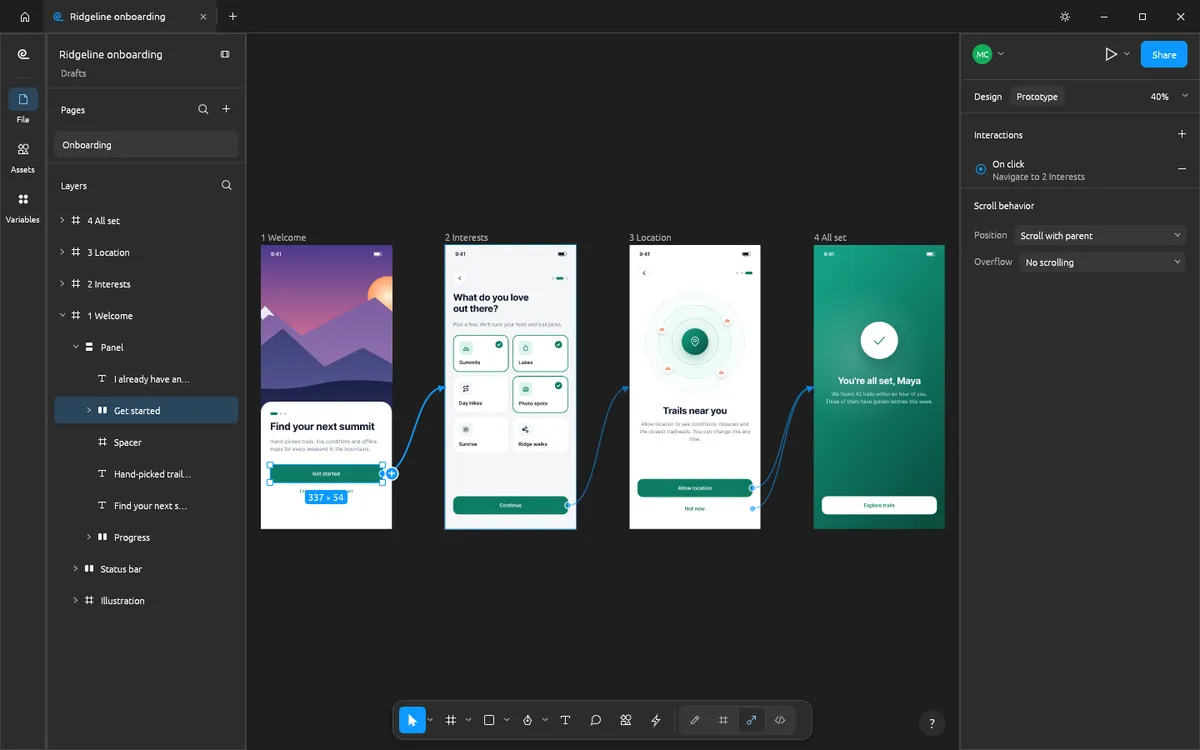
Design and images: FigCraft contributors, MIT OR Apache-2.0 — official example file from FigCraft v0.6.0.
What’s in this file
This file is a clickable onboarding flow for the Ridgeline app. Four phone screens are wired together in the Prototype tab — Get started, Continue, Allow location and Not now — so you can study how FigCraft builds interactions and play them in its presentation view.
- Four onboarding screens in one flow
- Connections from buttons to the next screen
- Transitions and back actions
- A named flow you can present
How to open it
- Download ridgeline-onboarding.figcraft from the official FigCraft repository.
- Install the free FigCraft desktop app for Windows, macOS, Linux or FreeBSD.
- Open the file with File ▸ Open, or drag it onto the FigCraft window.
The web version on this site starts with one blank document and cannot open files yet — it is great for trying the tools by hand.